Sign in with Apple
In the previous article, AuthService signs tokens and the other services verify them against its public keys. Sign in with Apple turns that around: Apple signs a token, and AuthService is the one verifying it, against the public keys Apple publishes. Once the token checks out, the user gets the same access and refresh tokens as with a password login.
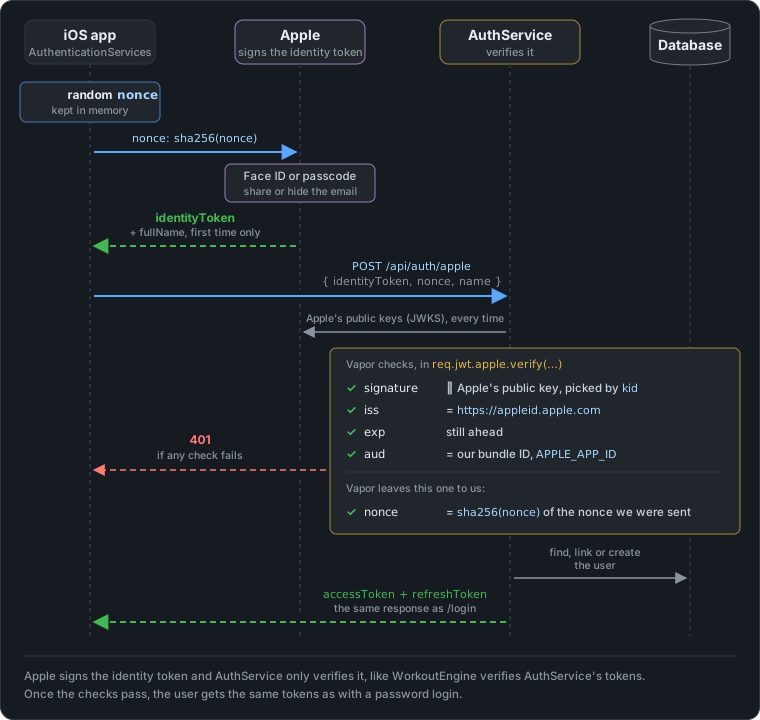
The app never sends a password. It sends Apple’s identity token, a short-lived JWT that says “this is Apple user sub, with this email, and the sign-in was started by this app”. AuthService has to decide whether to believe it, and which account it belongs to.
Here is the whole flow in the app, from the Sign In sheet to the dashboard (the Apple Account password step is cut out):
On the iOS side
The capability
The app needs the Sign in with Apple capability (Signing & Capabilities in Xcode), which adds this to the entitlements:
<key>com.apple.developer.applesignin</key>
<array>
    <string>Default</string>
</array>
The bundle ID matters on the server too: it ends up in the token’s aud claim, and AuthService only accepts tokens whose audience is its APPLE_APP_ID.
There is no redirect_uri to configure. That belongs to the web flow, where Apple has to send a browser back to your site. In a native app, AuthenticationServices shows Apple’s sheet itself and hands the result straight to the app.
The nonce
Before showing the sheet, the app makes a random nonce. Apple only gets its SHA-256, and copies that into the identity token. The raw value stays in the app until it goes to AuthService:
enum AppleSignInNonce {

    /// 32 random bytes from the system CSPRNG, base64url-encoded.
    static func random() -> String {
        var bytes = [UInt8](repeating: 0, count: 32)
        let status = SecRandomCopyBytes(kSecRandomDefault, bytes.count, &bytes)
        precondition(status == errSecSuccess, "Unable to generate a nonce (OSStatus \(status))")
        return Data(bytes).base64EncodedString()
            .replacingOccurrences(of: "+", with: "-")
            .replacingOccurrences(of: "/", with: "_")
            .replacingOccurrences(of: "=", with: "")
    }

    /// Lowercase hex SHA-256, matching the server's `String.sha256Hex`.
    static func sha256Hex(_ value: String) -> String {
        SHA256.hash(data: Data(value.utf8))
            .map { String(format: "%02x", $0) }
            .joined()
    }
}
The hash has to be lowercase hex, because that’s what the server computes from the raw value and compares with the claim. Why the nonce matters is explained in the server part, under “The nonce check”.
The button
LoginWithButtonView wraps SwiftUI’s SignInWithAppleButton. It sits below the email form on both the Sign In and the Sign Up sheet, since the server decides whether this is a sign-up or a sign-in:
SignInWithAppleButton(.continue) { request in
    nonce = AppleSignInNonce.random()
    request.requestedScopes = [.fullName, .email]
    request.nonce = AppleSignInNonce.sha256Hex(nonce)
} onCompletion: { result in
    switch result {
    case .success(let authorization):
        Task { await signIn(with: authorization) }
    case .failure(let error):
        // Closing the Apple sheet isn't an error worth showing.
        if (error as? ASAuthorizationError)?.code == .canceled { return }
        errorMessage = "Sign in with Apple failed. Please try again."
    }
}
The email scope is not optional for this app: without an email the server can’t create or link an account. The name scope is a nice-to-have.
Sending the token to AuthService
On success, the credential holds the identity token as Data, and, on the very first authorization only, the user’s name:
private func signIn(with authorization: ASAuthorization) async {
    guard !isSubmitting else { return }
    guard let credential = authorization.credential as? ASAuthorizationAppleIDCredential,
          let tokenData = credential.identityToken,
          let identityToken = String(data: tokenData, encoding: .utf8) else {
        errorMessage = "Sign in with Apple failed. Please try again."
        return
    }
    isSubmitting = true
    errorMessage = nil
    defer { isSubmitting = false }

    // Apple sends the name only on the first authorization, never in the token.
    let name = credential.fullName
        .map { PersonNameComponentsFormatter().string(from: $0) }
        .flatMap { $0.isEmpty ? nil : $0 }

    do {
        let response = try await APIService.shared.signInWithApple(identityToken: identityToken,
                                                                   nonce: nonce,
                                                                   name: name)
        guard let accessToken = response.token?.accessToken else {
            errorMessage = "Sign in with Apple failed. Please try again."
            return
        }
        userSession.signIn(accessToken: accessToken,
                           refreshToken: response.token?.refreshToken ?? "",
                           user: User(id: "",
                                      name: response.user?.name ?? name ?? "",
                                      email: response.user?.email ?? ""),
                           appleUserId: credential.user)
        onSignedIn()
    } catch APIServiceError.appleEmailNotShared {
        errorMessage = "We need your email address to create your account."
    } catch APIServiceError.appleIdConflict {
        errorMessage = "This email is already linked to a different Apple ID."
    } catch APIServiceError.appleSignInUnavailable {
        errorMessage = "Sign in with Apple isn't available right now."
    } catch {
        errorMessage = "Sign in with Apple failed. Please try again."
    }
}
APIService.signInWithApple calls the generated swift-openapi-generator client and turns each documented status into an error:
switch response {
case let .ok(okResponse):
    switch okResponse.body {
    case let .json(loginResponse):
        return loginResponse
    }
case .badRequest:
    throw APIServiceError.appleEmailNotShared
case .unauthorized:
    throw APIServiceError.appleTokenRejected
case .conflict:
    throw APIServiceError.appleIdConflict
case .notImplemented:
    throw APIServiceError.appleSignInUnavailable
case .undocumented:
    throw APIServiceError.appleSignInFailed
}
From here on, nothing is Apple-specific. UserSession.signIn stores the token pair in the Keychain, exactly as after a password login, and the refresh logic from Keeping Users Signed In takes over. The sheet is dismissed and the app shows the dashboard. There is no OTP screen either, because Apple has already verified the email.
Is the Apple ID still authorized?
Users can stop using Sign in with Apple for an app at any time in their Apple Account settings. Apple’s Verifying a user recommends checking for that, so the app keeps credential.user in the Keychain and asks on every launch:
private func checkAppleCredentialState() {
    guard let appleUserId = KeychainStore.read(KeychainKey.appleUserId) else { return }
    ASAuthorizationAppleIDProvider().getCredentialState(forUserID: appleUserId) { state, _ in
        guard state == .revoked || state == .notFound else { return }
        DispatchQueue.main.async { [weak self] in
            guard let self, self.isAuthenticated else { return }
            self.signOut()
        }
    }
}
It also listens for ASAuthorizationAppleIDProvider.credentialRevokedNotification, which covers a revocation while the app is running. This is a local check on the device, and it ends only the session that was started with Apple.
On the server side
What the app sends
POST /api/auth/apple takes three fields:
public struct AppleSignInDTO: Content {
    /// `credential.identityToken` as a UTF-8 string (a JWT signed by Apple).
    public let identityToken: String
    /// The raw nonce. The app must set `request.nonce` to its SHA-256 hex; the
    /// server hashes this value and compares it with the token's `nonce` claim.
    public let nonce: String
    /// Apple sends the name only on the very first authorization, so the app
    /// should pass it along when present.
    public let name: String?
}
Decoded, the payload of an identity token looks like this:
{
  "iss": "https://appleid.apple.com",
  "aud": "com.example.exerciselab",
  "exp": 1793000000,
  "iat": 1792999700,
  "sub": "001234.5f0c2b7e9a8d4e1f.1234",
  "nonce": "9b1d4c…e07a",
  "email": "user@example.com",
  "email_verified": true
}
The name isn’t in there, which is why it travels as a separate field.
Verifying the identity token
Apple’s Verifying a user lists five checks: the signature, the nonce, the issuer, the audience and the expiry. vapor/jwt does four of them in one call:
@Sendable func signInWithApple(req: Request) async throws -> LoginResponseDTO {
    guard !Environment.APPLEAPPID.isEmpty else {
        throw Abort(.notImplemented, reason: "Sign in with Apple is not configured")
    }
    try AppleSignInDTO.validate(content: req)
    let body = try req.content.decode(AppleSignInDTO.self)

    // Checks the signature against Apple's JWKS, the issuer, the expiry and
    // that the token was issued for our app.
    let appleToken: AppleIdentityToken
    do {
        appleToken = try await req.jwt.apple.verify(body.identityToken,
                                                    applicationIdentifier: Environment.APPLEAPPID)
    } catch {
        req.logger.info("Apple identity token rejected: \(error)")
        throw Abort(.unauthorized, reason: "Invalid Apple identity token")
    }
    // `verify` decodes the nonce but doesn't compare it, so we do: the token
    // carries only its SHA-256, and only the app that started the sign-in
    // knows the raw value. A stolen token alone can't be replayed.
    guard appleToken.nonce == body.nonce.sha256Hex else {
        throw Abort(.unauthorized, reason: "Invalid Apple identity token")
    }
    // …
}
req.jwt.apple.verify does what WorkoutEngine’s verifier from the previous article does, with Apple in AuthService’s place:
- It fetches Apple’s JWKS from
appleid.apple.com/auth/keys. Apple serves it withCache-Control: no-store, and Vapor respects that, so there is no cache: every sign-in fetches the keys again. That’s one extra request per sign-in, and signing in with Apple needs Apple to be up anyway. - It picks the key by the token’s
kidand checks the ES256 signature. - It checks that
issishttps://appleid.apple.comand thatexpis still ahead. - It checks that
audis our bundle ID,APPLE_APP_ID. Without this, an identity token that some other app received for the same Apple user would be accepted here too.
Every failure becomes the same 401 with the same message, so the response doesn’t tell anyone which check they got past. The real reason goes to the log.
The nonce check
The guard appleToken.nonce == body.nonce.sha256Hex line is AuthService’s own code, not Vapor’s. Vapor decodes the nonce claim into AppleIdentityToken, but the checks it runs on the payload are only these, from jwt-kit:
public func verify(using _: some JWTAlgorithm) throws {
    guard self.issuer.value == "https://appleid.apple.com" else {
        throw JWTError.claimVerificationFailure(failedClaim: issuer, reason: "Token not provided by Apple")
    }
    try self.expires.verifyNotExpired()
}
The audience is checked separately in req.jwt.apple.verify, and the nonce isn’t checked at all. Vapor can’t check it, because only the app knows which nonce it used. So the comparison is up to us:
- Before showing the Apple sheet, the app makes a random nonce and keeps it.
- It gives Apple only the SHA-256 of it, as
request.nonce. Apple copies that value into the token’snonceclaim. - It sends the raw nonce to AuthService together with the token.
- AuthService hashes the raw nonce and compares it with the claim.
The token only ever carries the hash, so having the token isn’t enough. Whoever sends it also needs the raw value, which never left the app that started the sign-in. A token copied from a log, a proxy or a crash report is useless on its own.
A token without a nonce claim fails too: nil never equals a hash, so the check doubles as “the nonce is required”.
Which account it belongs to
Once the token is trusted, sub identifies the Apple user. It never changes for this app, even if the user changes their email, so it’s what the account is linked by. The migration adds it as a nullable column with a unique constraint:
try await database.schema("users")
    .field("is_email_verified", .bool, .required, .sql(.default(false)))
    .field("apple_user_id", .string)
    .unique(on: "apple_user_id")
    .update()
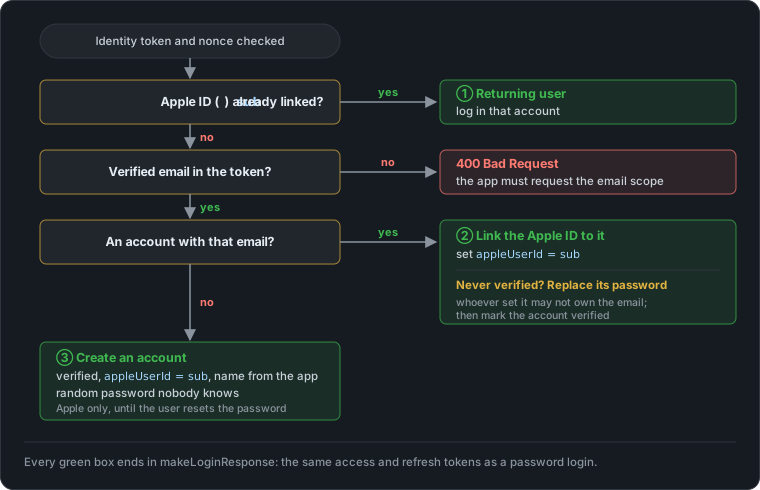
There are three ways a sign-in can go:
let appleUserId = appleToken.subject.value

// 1. Returning Apple user.
if let user = try await User.query(on: req.db).filter(\.$appleUserId == appleUserId).first() {
    return try await makeLoginResponse(for: user, req: req)
}

guard let email = appleToken.email, appleToken.emailVerified?.value == true else {
    throw Abort(.badRequest, reason: "Apple did not share a verified email. Request the email scope.")
}

// 2. An email account already exists: link it. Apple has verified the
// email, so this person owns it. If that account was never verified,
// whoever set its password may not own the email, so the password is
// replaced to stop them from getting in.
if let user = try await User.query(on: req.db).filter(\.$email == email).first() {
    // Never move an account from one Apple ID to another.
    if let linked = user.appleUserId, linked != appleUserId {
        throw Abort(.conflict, reason: "This account is linked to a different Apple ID")
    }
    user.appleUserId = appleUserId
    if !user.isEmailVerified {
        user.passwordHash = try await req.password.async.hash(TokenHelper.createRefreshToken())
        user.isEmailVerified = true
    }
    return try await saveAppleUser(user, appleUserId: appleUserId, req: req)
}

// 3. New user. The password is random and never shown, so the account
// can only use Apple until the user sets one through forgotPassword.
let name = body.name?.trimmingCharacters(in: .whitespacesAndNewlines) ?? ""
let user = User(name: name,
                email: email,
                passwordHash: try await req.password.async.hash(TokenHelper.createRefreshToken()),
                isEmailVerified: true,
                appleUserId: appleUserId)
return try await saveAppleUser(user, appleUserId: appleUserId, req: req)
Every path ends in makeLoginResponse, the same function login and verifyEmail use, so the rest of the system can’t tell how the user signed in. saveAppleUser is covered under “Two requests at once” below.
Edge cases
A new user
Nobody has this Apple ID or this email yet, so the server creates an account (case 3). It is verified from the start, because Apple vouches for the email, and it has no OTP step.
The account still needs a password hash, because the users table requires one. It gets the Bcrypt hash of a random 40-character string, made by the same generator as refresh tokens, that nobody ever sees. So until the user sets a password through forgot password, they can only sign in with Apple. If they later try to sign up with email and the same address, they get 409 “This email is already registered”, like with any other verified account.
A returning Apple user
The account is found by sub (case 1), before the email is even looked at. That’s why it keeps working when the user changes the email of their Apple ID, or signs in with a hidden email the second time.
Already registered with email, and verified
Someone signed up with email and password, verified it with the OTP, and now taps “Sign in with Apple” with the same email. The Apple ID is linked to that account (case 2). Nothing else changes: the password stays, so both ways of signing in work from now on, and both lead to the same account and the same data.
Already registered with email, but never verified
This is the case that is easy to get wrong. The email account exists, but nobody ever entered the OTP, so nobody has proven that whoever set its password owns the email. Linking it and keeping the password would open the door to account pre-hijacking:
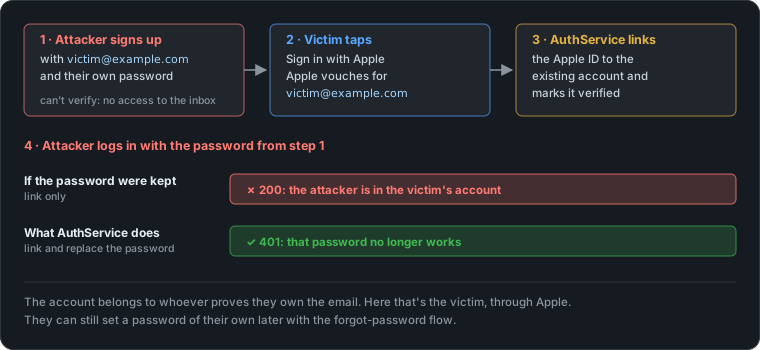
The attacker creates the account before the victim does and waits for the victim to bring it to life. The USENIX Security 2022 study by Sudhodanan and Paverd found this kind of attack on dozens of popular services, and this exact case, a password account merged with a federated login, is their “classic–federated merge” attack.
So the server links the account, marks it verified, and replaces the unproven password with a random one. The person who proved they own the email keeps the account. If the unverified signup was actually theirs, nothing is lost: they’re signed in, and they can set a password again through forgot password.
The account is already linked to a different Apple ID
Two Apple IDs can end up with the same email, for example when one of them changes its address to one the other used before. Case 2 then finds an account that already has an appleUserId, and it isn’t this one. The server answers 409 instead of moving the account to the new Apple ID, which would lock out the one that was linked first. The app shows “This email is already linked to a different Apple ID”.
Hide My Email
Apple lets users hide their real address behind a relay address like abc123@privaterelay.appleid.com. That’s still a verified email as far as the token is concerned, so the sign-in works. But it won’t match an existing account created with the real address, so the user ends up in case 3, with a new account. There is no way around that on the server: the real address is exactly what the user chose not to share.
No email in the token
Apple only includes the email when the app asked for the email scope. Without it there is nothing to link or create an account with, so the server answers 400 and the app says it needs the email address.
Two requests at once
If the app sends the same first sign-in twice, for example a retry after a timeout, both requests miss case 1 and both try to save. The second one breaks a unique constraint. Instead of answering 500, saveAppleUser notices that and logs in the account the first request created:
private func saveAppleUser(_ user: User, appleUserId: String, req: Request) async throws -> LoginResponseDTO {
    do {
        try await user.save(on: req.db)
    } catch where (error as? any DatabaseError)?.isConstraintFailure == true {
        guard let existing = try await User.query(on: req.db)
            .filter(\.$appleUserId == appleUserId)
            .first() else { throw error }
        return try await makeLoginResponse(for: existing, req: req)
    }
    return try await makeLoginResponse(for: user, req: req)
}
On the app side, the button is disabled while a request is running, so a second tap can’t start one.
The user closes the Apple sheet
SignInWithAppleButton reports that as an ASAuthorizationError.canceled failure. The app ignores it, because the user meant to do it.
The name is a one-time gift
Apple sends the name only with the first authorization. If that first request to AuthService fails, Apple won’t send the name again on the next try, and the account is created without one. The user would have to stop using Sign in with Apple for the app in their Apple Account settings to get the first-time sheet back.
Sign in with Apple is not configured
Without APPLE_APP_ID there is no audience to check, and verifying a token without one would accept tokens issued to any app. So the endpoint answers 501 Not Implemented instead, and AuthService logs a warning at startup:
if Environment.APPLEAPPID.isEmpty {
    app.logger.warning("APPLE_APP_ID is not set — Sign in with Apple is disabled")
}
That keeps local development and test environments working without an Apple Developer setup, and makes the missing variable obvious in the log rather than in a confusing 401. The app shows “Sign in with Apple isn’t available right now”.
What’s next: server-to-server notifications
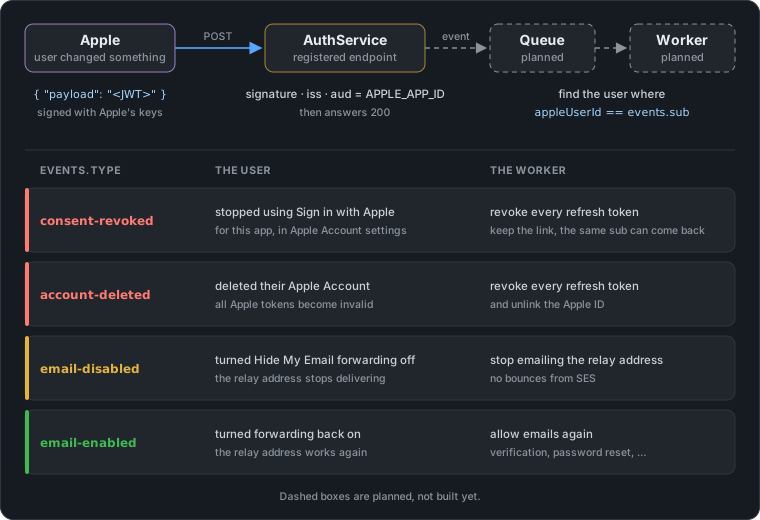
Apple can also tell the server when a user changes something on their side. You register one HTTPS endpoint on the primary App ID in the developer portal (Identifiers → your App ID → Sign In with Apple → Configure), and Apple posts a signed JWT to it.
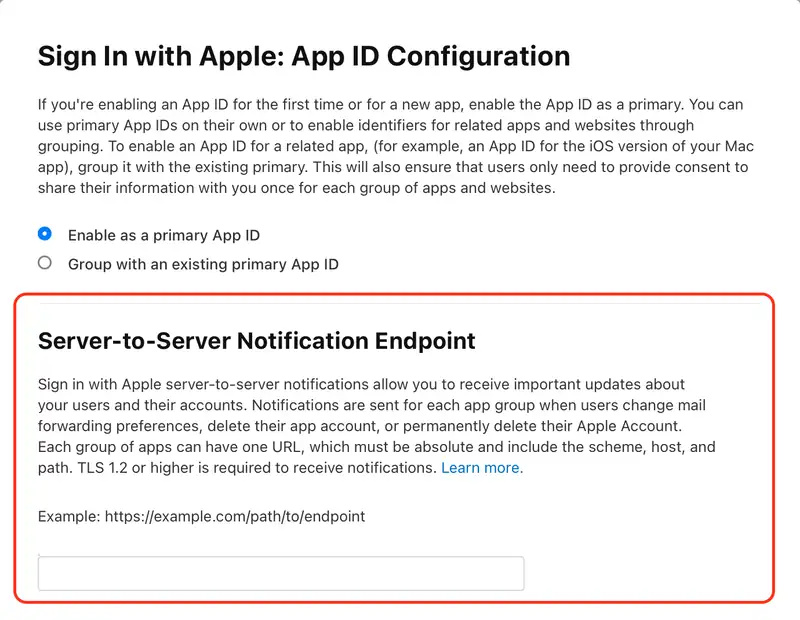
AuthService doesn’t handle these yet; the plan is to verify the JWT and hand each event to a Vapor queue so that each request will be handled with a job.