Rotating JWT Signing Keys
Every access token in this project is a JWT that AuthService signs and the other services verify. The previous article covered how those tokens are refreshed. This one is about the key that signs them: why it has to be replaceable, and how AuthService replaces it without signing anyone out and without redeploying the services that verify tokens.
Why rotate signing keys at all
Whoever holds the signing key can create a valid access token for any user, with any role, admin included. Every service accepts that token, because it checks only the signature. So the signing key is the most valuable secret in the system, and there are good reasons to make sure it can be changed:
- It might leak. Keys end up in environment variables, CI logs, backups, screenshots and old laptops. If one leaks, it has to be replaced at once, and that is the worst moment to find out the system can’t do it without an outage.
- Exposure grows with time. The longer a key is in use, the more places it has been copied to and the more tokens it has signed. Security guidance therefore limits how long a key may be used, its cryptoperiod. See the OWASP Key Management Cheat Sheet and NIST SP 800-57 Part 1.
- A procedure that is never run doesn’t work. If keys only change during an incident, the change happens for the first time under pressure. Rotating on a schedule keeps the process tested.
- Algorithms change. A key identifier lets an old key and a new one, even of a different type, be valid at the same time while everything moves over.
The hard part isn’t generating a new key. It’s that tokens signed with the old key are still in use, and other services need the new public key before they see the first token signed with it. If the key is simply swapped, tokens already in use stop verifying at that moment, and each verifying service rejects the new tokens until it is redeployed with the new key.
From one shared secret to a keyring
The project got there in three steps:
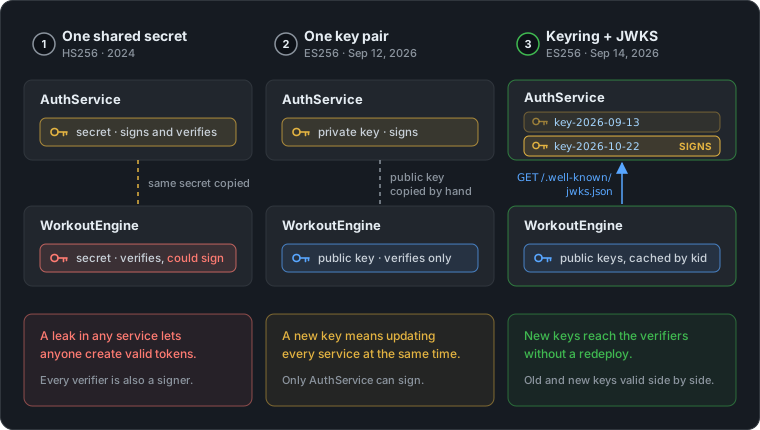
- One shared secret (HS256). The first version signed tokens with HMAC-SHA256 and one secret:
app.jwt.signers.use(.hs256(key: jwtSecret)). With HMAC, verifying needs the same secret as signing, so every service that checked tokens could also create them. A leak in any service meant a leak everywhere. - One key pair (ES256). The secret was replaced with an ECDSA P-256 key pair. Only AuthService has the private key and can sign. The other services hold only the public key, so they can verify but not sign. But the public key was copied into each service’s configuration by hand, so changing the key still meant updating every service at once.
- A keyring with key ids, published as a JWKS. AuthService now holds several private keys, each with a key id (
kid). It signs with one of them and publishes all the public keys at one URL. The other services fetch the keys from there, so a new key reaches them without a redeploy.
The rest of this article is about step 3.
Key ids: which key signed this token?
A JWT starts with a header, and the header can name the key that signed it with the kid parameter. Decoded, the header of an access token from AuthService looks like this:
{ "alg": "ES256", "kid": "key-2026-10-22", "typ": "JWT" }
When a token arrives, the verifier reads the kid, picks the public key with that id and checks the signature with it. Because each token says which key signed it, any number of keys can be valid at the same time. That is what makes a smooth handover possible.
The key ids here are just the date the key was created. A kid can be any string, but a date shows at a glance how old a key is.
Signing and verifying a token
A JWT has three parts, each base64url-encoded and joined with dots: header.payload.signature. Signing means computing the signature over header.payload with the private key. Verifying means checking that signature with the matching public key. If even one character of the header or payload changes, the check fails.
The two happen at different times and in different places:
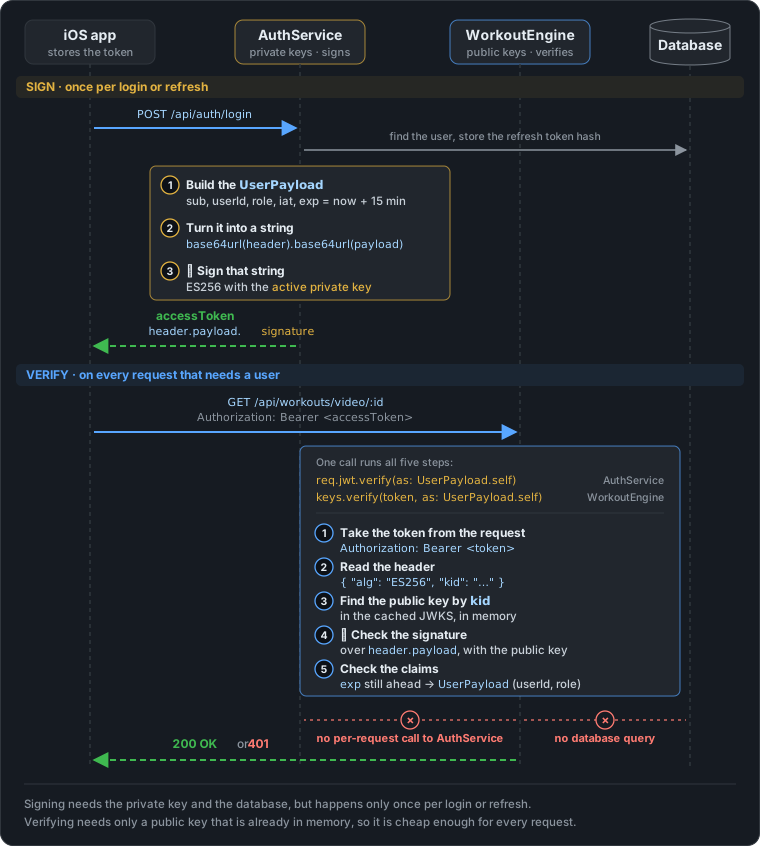
When a token is signed
Only when AuthService hands out a new access token: on login, after email verification, on Sign in with Apple, and on every refresh. All four call User.generateToken, which fills in a UserPayload and signs it. Both shortened:
public struct UserPayload: JWTPayload {
    public var subject: SubjectClaim        // "sub": the user's email
    public var issuedAt: IssuedAtClaim      // "iat"
    public var expiration: ExpirationClaim  // "exp": now + 15 minutes
    public var userId: String
    public var role: RoleEnum               // admin, free, tier1, tier2
    public var isAdmin: Bool

    /// Runs after the signature check.
    public func verify(using algorithm: some JWTAlgorithm) async throws {
        try self.expiration.verifyNotExpired()
    }
}
public func generateToken(req: Request) async throws -> (String, Date) {
    let jwt = UserPayload(subject: .init(value: self.email),
                          userId: try self.requireID().uuidString,
                          role: try await self.getUserRole(req: req).toRoleEnum())

    guard let manager = req.application.keyRotationManager else {
        throw Abort(.internalServerError, reason: "KeyRotationManager not configured")
    }
    let token = try await manager.signToken(jwt)   // active key, kid in the header
    return (token, jwt.expiration.value)
}
generateToken doesn’t choose a key. signToken uses whichever key is active, which is what lets the key change without touching this code. KeyRotationManager is covered below.
When a token is verified
On every request that needs to know who the user is. WorkoutEngine does it with req.verifiedUserPayload(), for example before handing out a video URL:
// WorkoutEngine
@Sendable func getVideo(req: Request) async throws -> VideoResponseDTO {
    guard await req.verifiedUserPayload() != nil else {
        throw Abort(.unauthorized)
    }
    // …
}

// ELabModels, Request+Ext.swift
public func verifiedUserPayload() async -> UserPayload? {
    guard let token = headers.bearerAuthorization?.token else { return nil }
    return await JWKSVerifier.shared.payload(for: token)
}
AuthService verifies its own tokens too, on GET /api/user and POST /api/auth/logoutAll, through a small middleware that stores the user id and role for the handler:
public struct JWTMiddleware: AsyncMiddleware {
    public func respond(to request: Request, chainingTo next: AsyncResponder) async throws -> Response {
        do {
            let userPayload = try await request.jwt.verify(as: UserPayload.self)
            request.additionalInfo = userPayload.userId
            request.roleInfo = userPayload.role
            return try await next.respond(to: request)
        } catch {
            throw Abort(.unauthorized)
        }
    }
}
The important line is try await request.jwt.verify(as: UserPayload.self). It does more than decode the token. It takes the token from the Authorization: Bearer header (and answers 401 if there is none), reads the kid from the token’s header, picks the public key with that id, checks the signature, and then calls UserPayload.verify(using:) to check the expiry. Only if all of that passes do you get a UserPayload back. WorkoutEngine runs the same checks inside JWKSVerifier, with keys.verify(token, as: UserPayload.self) on its cached keys. If any check fails, the token is rejected: JWTMiddleware answers 401, and verifiedUserPayload() returns nil, which getVideo turns into a 401.
Verifying needs no database and no call to AuthService, which is what makes it cheap enough to run on every request. It is also why a signed token stays valid until it expires, even after logout, as the previous article explained in “What logout can’t do”.
The keyring
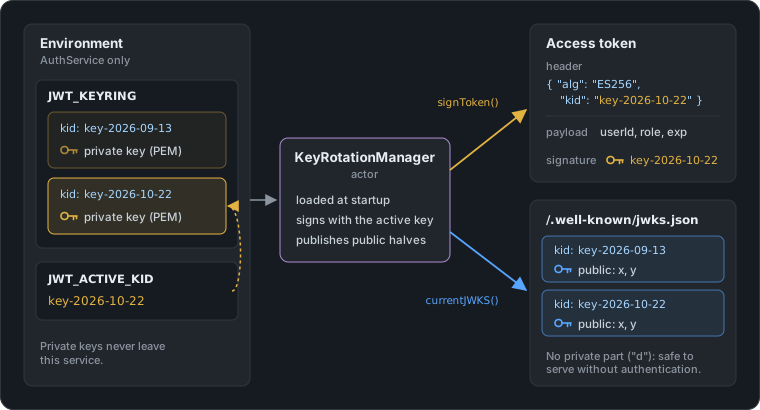
The keys reach AuthService through two environment variables:
JWT_KEYRINGholds all the private keys.JWT_ACTIVE_KIDsays which of them signs new tokens.
# JWT_KEYRING, before base64 encoding:
[
  { "kid": "key-2026-09-13", "privateKeyB64": "<base64 of the PEM file>" },
  { "kid": "key-2026-10-22", "privateKeyB64": "<base64 of the PEM file>" }
]

JWT_ACTIVE_KID=key-2026-10-22
The whole JSON array is base64-encoded into a single line, and each PEM key inside it is base64-encoded once more. A PEM file contains line breaks, and those don’t survive environment variables and JSON strings reliably. A one-line base64 string does.
A new key is one OpenSSL command away. prime256v1 is OpenSSL’s name for the P-256 curve that ES256 uses:
openssl ecparam -genkey -name prime256v1 -noout -out key-2026-10-22.pem
base64 < key-2026-10-22.pem | tr -d '\n'     # → privateKeyB64
Here is how the keyring, the signing and the published keys fit together:
Failing at startup, not at the first login
The keyring is parsed in an extension on Vapor’s Environment, in ELabModels. It undoes the two layers of base64 and returns the key ids with their PEM strings:
extension Environment {
    public static let JWTKEYRING   = Self.get("JWT_KEYRING") ?? ""
    public static let JWTACTIVEKID = Self.get("JWT_ACTIVE_KID") ?? ""

    /// Parsed signing keyring (kid + private-key PEM). AuthService only.
    public static func jwtKeyEntries() -> [JWTKeyEntry] {
        guard let data = Data(base64Encoded: JWTKEYRING),
              let raw = try? JSONDecoder().decode([JWTKeyEntryRaw].self, from: data) else {
            return []
        }
        return raw.compactMap { entry in
            guard let pemData = Data(base64Encoded: entry.privateKeyB64),
                  let pem = String(data: pemData, encoding: .utf8) else { return nil }
            return JWTKeyEntry(kid: entry.kid, privatePEM: pem)
        }
    }
}

/// One entry of the signing keyring: a key id and its private-key PEM.
public struct JWTKeyEntry: Sendable {
    public let kid: String
    public let privatePEM: String
}

/// Wire shape of a keyring entry as stored in `JWT_KEYRING`.
private struct JWTKeyEntryRaw: Decodable {
    let kid: String
    let privateKeyB64: String
}
There are two types on purpose. JWTKeyEntryRaw is the shape in the environment variable and stays private to this file. JWTKeyEntry is what the rest of the code works with: the PEM is already decoded, so no other code has to know about base64. A missing variable, broken base64 or invalid JSON all end the same way, in an empty array.
configure.swift calls it when the service starts. If the result is empty, AuthService refuses to start:
let keyEntries = Environment.jwtKeyEntries()
let activeKid = Environment.JWTACTIVEKID
guard !keyEntries.isEmpty else {
    throw Abort(.internalServerError, reason: "JWT_KEYRING is empty or invalid")
}
app.keyRotationManager = try await KeyRotationManager(entries: keyEntries,
                                                      activeKid: activeKid)
KeyRotationManager adds one more check: the active kid has to be one of the keys in the ring. A typo in JWT_ACTIVE_KID therefore stops the deployment straight away, instead of starting a service that fails on every login.
KeyRotationManager
KeyRotationManager lives in the shared ELabModels package, but only AuthService creates one, because it is the only service that holds private keys. It is adapted from Vapor’s official jwt-key-rotation example and is built on JWTKeyCollection from jwt-kit, the library behind Vapor’s JWT support. Shortened:
public actor KeyRotationManager {
    private let keyCollection: JWTKeyCollection
    private var currentKeyId: JWKIdentifier
    private var publicKeys: [JWKIdentifier: ES256PublicKey]

    public init(entries: [JWTKeyEntry], activeKid: String) async throws {
        guard entries.contains(where: { $0.kid == activeKid }) else {
            throw Abort(.internalServerError,
                        reason: "JWT_ACTIVE_KID '\(activeKid)' is not present in JWT_KEYRING")
        }
        let collection = JWTKeyCollection()
        var pubs: [JWKIdentifier: ES256PublicKey] = [:]
        for entry in entries {
            let key = try ES256PrivateKey(pem: entry.privatePEM)
            let kid = JWKIdentifier(string: entry.kid)
            await collection.add(ecdsa: key, kid: kid)
            pubs[kid] = key.publicKey
        }
        self.keyCollection = collection
        self.publicKeys = pubs
        self.currentKeyId = JWKIdentifier(string: activeKid)
    }

    /// Signs with the active key and writes its `kid` into the header.
    public func signToken(_ payload: some JWTPayload) async throws -> String {
        try await keyCollection.sign(payload, kid: currentKeyId)
    }

    /// Starts using a new key; the previous ones keep verifying.
    public func rotateKey(newKey: ES256PrivateKey, newKeyId: JWKIdentifier) async {
        currentKeyId = newKeyId
        publicKeys[newKeyId] = newKey.publicKey
        await keyCollection.add(ecdsa: newKey, kid: newKeyId)
    }

    /// Drops every key except the active one, once old tokens have expired.
    public func removeOldKeys() async {
        _ = await keyCollection.removeAll(except: [currentKeyId])
        publicKeys = publicKeys.filter { $0.key == currentKeyId }
    }

    /// The public halves of all keys, for the JWKS endpoint.
    public func currentJWKS() -> JWKS {
        JWKS(keys: publicKeys.compactMap { kid, key in
            key.parameters.map {
                JWK.ecdsa(.es256, identifier: kid, x: $0.x, y: $0.y, curve: .p256)
            }
        })
    }
}
generateToken, which you saw in the earlier articles, just calls signToken. It never needs to know which key is active.
It is an actor because its state can change while requests are using it. rotateKey changes the active key, while many logins may be signing tokens at the same moment. The actor runs these calls one at a time, so a token is never signed while the switch is only half done.
AuthService also verifies tokens itself, for example in logoutAll behind JWTMiddleware. For that, configure.swift adds every key in the ring to Vapor’s own key collection as well (app.jwt.keys.add(ecdsa:kid:)). req.jwt.verify then picks the right key by kid, just as the other services do.
Publishing the public keys: JWKS
A JSON Web Key Set (JWKS) is a standard JSON format for a list of public keys. AuthService serves its keys at /.well-known/jwks.json:
app.get(".well-known", "jwks.json") { req -> Response in
    guard let manager = req.application.keyRotationManager else {
        throw Abort(.internalServerError, reason: "KeyRotationManager not configured")
    }
    let jwks = await manager.currentJWKS()
    let data = try JSONEncoder().encode(jwks)
    var headers = HTTPHeaders()
    headers.contentType = .json
    return Response(status: .ok, headers: headers,
                    body: .init(string: String(decoding: data, as: UTF8.self)))
}
During a rotation, the response contains two keys:
{
  "keys": [
    { "kty": "EC", "crv": "P-256", "alg": "ES256", "kid": "key-2026-09-13", "x": "…", "y": "…" },
    { "kty": "EC", "crv": "P-256", "alg": "ES256", "kid": "key-2026-10-22", "x": "…", "y": "…" }
  ]
}
An EC public key is a point on the curve, given by its x and y coordinates. A private key would also have a d field. It is never in this response, so the endpoint is safe to serve without authentication. The big identity providers work the same way. See Apple’s keys for Sign in with Apple and Google’s. OpenID Connect Discovery advertises this URL as jwks_uri, and the /.well-known/ prefix follows the convention from RFC 8615.
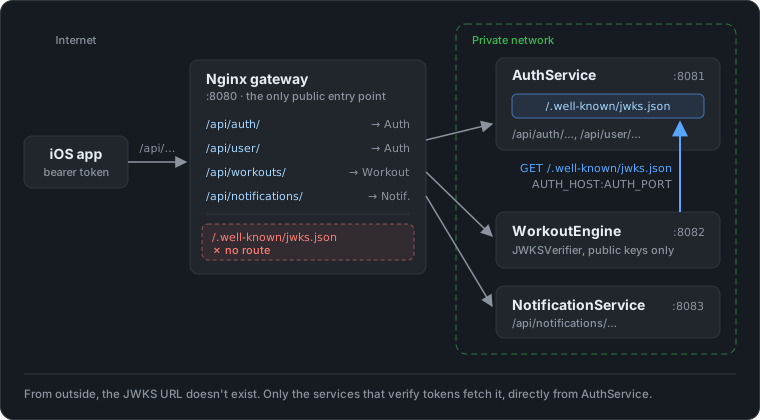
In this project the endpoint isn’t routed through the Nginx gateway, which forwards only /api/… paths. The other services fetch it from AuthService directly, inside the private network.
How the other services pick up a new key
WorkoutEngine verifies tokens with JWKSVerifier, an actor from ELabModels that holds only public keys. It caches the JWKS and fetches it again when a request arrives after the cached copy is more than five minutes old. That alone would pick up a new key within a few minutes. But it also refetches straight away when a token names a kid it doesn’t know yet:
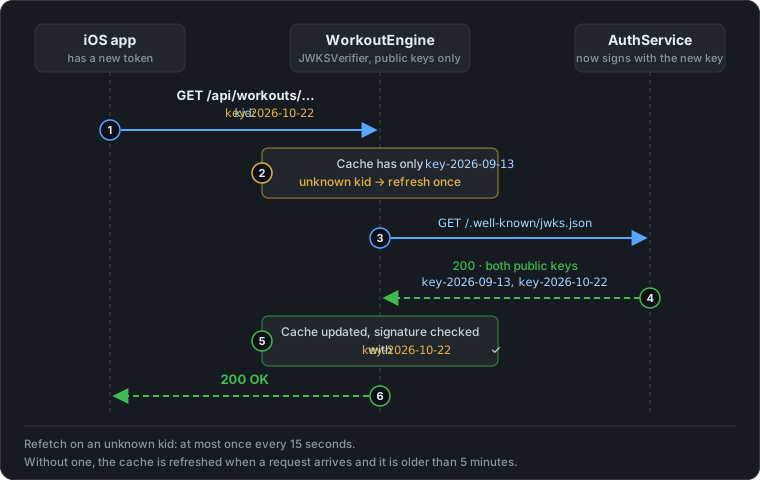
public func payload(for token: String) async -> UserPayload? {
    await refreshIfStale()                                  // cache older than 5 minutes?

    if trustable, let payload = try? await keys?.verify(token, as: UserPayload.self) {
        return payload
    }

    // Unknown kid / empty or expired cache → refresh (rate-limited) and retry once.
    guard await refresh() else { return nil }
    return try? await keys?.verify(token, as: UserPayload.self)
}
The refetch is rate-limited to one attempt every 15 seconds. Otherwise a stream of tokens with made-up kids would turn into a stream of requests to AuthService. What the verifier does when AuthService can’t be reached is covered in “When things go wrong” below.
Rotating a key, step by step
Put together, a planned rotation has four steps. The old key here is key-2026-09-13 and the new one is key-2026-10-22:
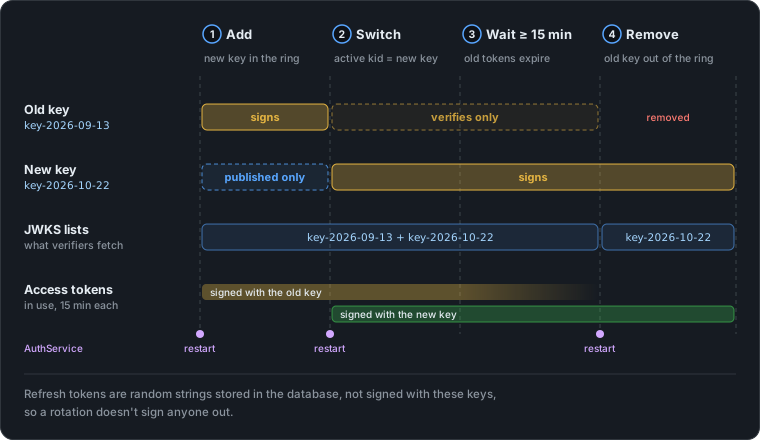
- Add the new key, keep signing with the old one. Add
key-2026-10-22toJWT_KEYRING, leaveJWT_ACTIVE_KIDunchanged, and restart AuthService. The JWKS now lists both keys, and every verifier picks up the new public key the next time it refreshes its cache. - Switch. Set
JWT_ACTIVE_KID=key-2026-10-22and restart again. New tokens are signed with the new key. Tokens signed with the old key still verify, because the old key is still in the ring. - Wait for old tokens to expire. Access tokens live for 15 minutes, so 15 minutes after the switch no valid token signed with the old key is left. Waiting a bit longer does no harm.
- Remove the old key. Delete
key-2026-09-13fromJWT_KEYRINGand restart. The JWKS lists only the new key, the verifiers drop the old one at their next cache refresh, and the old private key can be destroyed.
Step 1 isn’t strictly needed, because verifiers refetch on an unknown kid anyway. But it means the first token signed with the new key never has to wait for that refetch.
The users don’t notice any of this. Refresh tokens are random strings stored in the database, not signed JWTs, so rotating the signing key doesn’t affect them. Nobody is signed out.
When a key has leaked
Private keys rarely get stolen by breaking the cryptography. They leak through the places they are kept:
- Source code and repositories. A key committed “just for testing” stays in the git history after it is deleted from the files (CWE-798). GitHub runs secret scanning on pushes for exactly this reason.
- Logs. A debug line that prints the configuration prints the keyring with it (CWE-532).
- Environment variables. They show up in crash reports, debug endpoints and process listings (CWE-526). This is the main weakness of keeping the keyring in the environment.
- Container images. A secret passed as a build argument is stored in the image’s layers. Docker’s documentation on build secrets explains how to avoid that.
- People and machines. Backups, shared screenshots, old laptops, a teammate’s compromised account.
The OWASP Secrets Management Cheat Sheet covers how to store secrets so these leaks are less likely, and RFC 8725, the JWT best-practices RFC, covers the token side.
If a key has leaked, waiting is not an option, because whoever has it can create tokens for as long as it is trusted. Expiry doesn’t help either: a forged token carries whatever exp the attacker writes into it. In that case, do steps 2 and 4 together: make the new key active and remove the leaked one in the same restart.
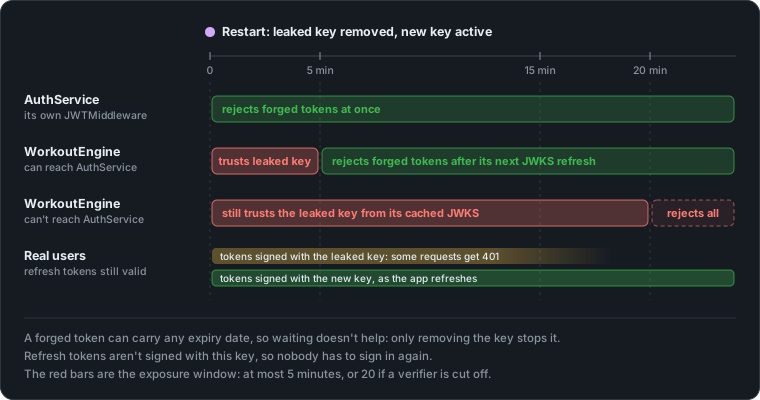
AuthService stops accepting tokens signed with the leaked key at once, including tokens the attacker made. The other services stop when they next refresh their cached JWKS, within five minutes, or within 20 if they can’t reach AuthService (more on that below). Real users keep their sessions: their refresh tokens are still valid, and the next refresh gives them an access token signed with the new key. The app refreshes when the current access token is about to expire, so within 15 minutes everyone has a token signed with the new key. Until then, some of their requests can fail.
Why restarts and not rotateKey
KeyRotationManager can also rotate while running, through rotateKey and removeOldKeys, with no restart. The default flow still uses environment variables and restarts. AuthService can run as several instances behind a load balancer. If a key were rotated inside one running instance, that instance would sign with a key the others don’t have, and its tokens would fail verification whenever they reached one of the others. With the keyring in the environment, every instance always has the same keys. The runtime methods are there for the day the keyring moves into a shared secret store.
When things go wrong
Everything above assumes that WorkoutEngine can always reach AuthService. The interesting cases are the ones where it can’t.
AuthService can’t be reached
JWKSVerifier keeps the last JWKS it fetched, so a short outage doesn’t stop anyone. But it doesn’t trust that copy forever. Three numbers control its cache:
static let `default` = Configuration(
    ttl: .minutes(5),                  // fetch again when the cache is older than this
    minRefreshInterval: .seconds(15),  // at most one attempt per 15 s, success or not
    maxStaleness: .minutes(20)         // stop trusting the cache after this
)
The initializer checks minRefreshInterval < ttl < maxStaleness with a precondition, so a wrong combination crashes the service the moment the configuration is created, instead of quietly misbehaving. Together, the three numbers give the verifier three states:
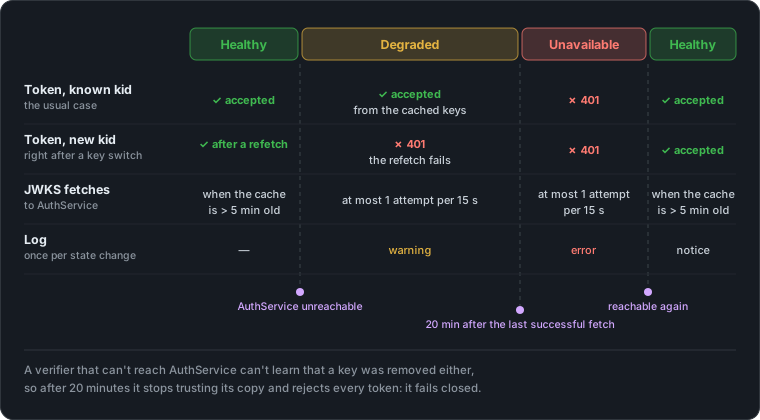
- Degraded. Fetches fail, but the cached keys are less than 20 minutes old. Tokens signed with a known key are still accepted. A token with a new
kidis rejected, because the refetch it triggers fails. Fetches are tried at most once every 15 seconds, so an outage doesn’t turn every incoming request into another request to AuthService. - Unavailable. 20 minutes after the last successful fetch, the verifier rejects every token. It fails closed.
- Healthy again. The first fetch that succeeds puts everything back to normal. No restart is needed.
Each change of state is logged once (a warning, an error, a notice), not once per request, so an outage leaves a few clear lines in the log rather than thousands.
Why fail closed? Because a verifier that can’t reach AuthService can’t learn that a key was removed either. If it trusted its cache forever, a leaked key that was removed from AuthService would stay valid at that service for as long as the outage lasts. The 20-minute limit puts an upper bound on that.
Why 20 minutes? With steady traffic, the last successful fetch happened at most 5 minutes before the outage started, so the verifier fails closed 15 to 20 minutes after it starts. If AuthService itself is down, nobody can sign in or refresh, and the last access tokens it issued expire 15 minutes after it went down. So when the verifier starts refusing tokens, there are none left to refuse. The limit only really bites when AuthService is up but WorkoutEngine can’t reach it, for example because of a network or DNS problem between the two. Users still get new tokens through the gateway, and after 20 minutes WorkoutEngine answers every request with 401. That’s what the single error line in the log is for.
Other things that can go wrong
| What goes wrong | What happens | How bad it is |
|---|---|---|
| The new key becomes active while a verifier can’t reach AuthService | Tokens with the new kid are unknown to that verifier, and the refetch fails | 401 at that service until it can fetch again. Waiting at least 5 minutes between step 1 and step 2 means every healthy verifier already has the new key. |
| The old key is removed before its tokens have expired | Those tokens now have an unknown kid everywhere | Some requests fail for up to 15 minutes. The app refreshes shortly before a token expires, not on a 401. Nobody is signed out. |
A typo in JWT_ACTIVE_KID, or a broken keyring | AuthService refuses to start | The new version never comes up, instead of failing on every login. |
| Every private key is lost | Create a new keyring and restart | Same as a leak: every access token stops working, the app gets new ones within 15 minutes, refresh tokens still work. |
| AuthService returns a JWKS that can’t be parsed | The fetch counts as failed | Same as an outage: the old cache keeps working until it is 20 minutes old. |
Someone sends tokens with made-up kids | Each one would trigger a refetch | At most one fetch every 15 seconds per WorkoutEngine instance, whatever the traffic. |
None of these cases sign a user out, because refresh tokens don’t depend on the signing key. The worst any of them does is make some requests fail for a few minutes.
The next article turns the tables. With Sign in with Apple, Apple signs the token and AuthService is the one verifying it, against the public keys Apple publishes as a JWKS, just like the one in this article. It covers what Vapor checks for you, the nonce check it leaves to you, and how an Apple ID is linked to an account that already exists.