Keeping Users Signed In
The first article ended with login returning two tokens: an access token that lives for 15 minutes and a refresh token that lives for 30 days. This article covers what happens after those 15 minutes are up: how the app gets a new access token, why the refresh token changes every time it is used, why it is hashed with SHA-256 when passwords use Bcrypt, and how a session ends.
The refresh flow
When the access token is about to expire, the app sends its refresh token to POST /auth/refreshToken. It gets back a new access token and a new refresh token. The old refresh token stops working at that moment.
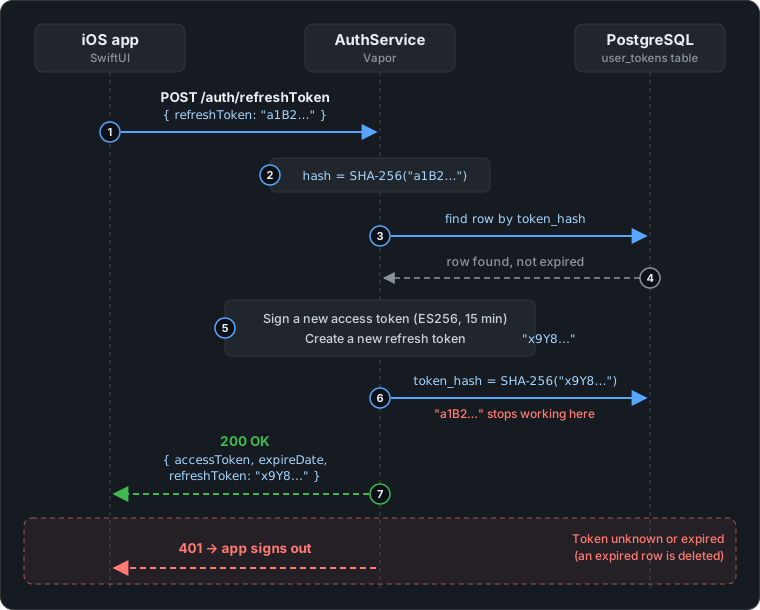
- The app sends its current refresh token,
"a1B2…". - AuthService hashes it with SHA-256. The database only ever sees hashes.
- It looks up the row with that hash in the
user_tokenstable. - The row exists and hasn’t expired.
- AuthService signs a new access token and creates a new refresh token,
"x9Y8…". - It replaces the stored hash with the hash of
"x9Y8…". From this moment"a1B2…"no longer matches any row. - The app receives both new tokens and stores them in the Keychain.
If the token is unknown or expired, the answer is 401 Unauthorized, and the app takes that as “the session is over, sign in again”.
Rotating the refresh token
Here is the handler, slightly shortened:
@Sendable func refreshToken(req: Request) async throws -> TokenResponseDTO {
    try RefreshTokenDTO.validate(content: req)
    let body = try req.content.decode(RefreshTokenDTO.self)

    guard let userToken = try await UserToken.query(on: req.db)
        .filter(\.$tokenHash == body.refreshToken.sha256Hex)
        .first() else {
        throw Abort(.unauthorized)                 // unknown token
    }
    guard userToken.expiredAt > Date() else {
        try await userToken.delete(on: req.db)     // expired: clean it up
        throw Abort(.unauthorized)
    }

    try await userToken.$user.load(on: req.db)
    let (accessToken, expireDate) = try await userToken.user.generateToken(req: req)

    // Rotate: same row, new hash. The token the client just sent is now dead.
    let newRefreshToken = TokenHelper.createRefreshToken()
    userToken.tokenHash = newRefreshToken.sha256Hex
    try await userToken.save(on: req.db)

    return TokenResponseDTO(accessToken: accessToken,
                            refreshToken: newRefreshToken,
                            expireDate: expireDate)
}
Three details are worth pointing out:
- The lookup uses the hash. The client sends the raw token. The server hashes it and searches for that hash, because the raw token is never stored.
- Every refresh replaces the token. This is called rotation. A refresh token copied from a device, a log or a backup only works until the next refresh, by either the app or whoever copied it. Without rotation, the same token would work for the full 30 days.
- Rotation doesn’t extend the session. Only
token_hashchanges.expiredAtkeeps the date set at login, so a session lasts at most 30 days however active the user is. After that, they have to sign in again.
The access token itself is signed in generateToken with the service’s current ES256 key. The next article in this series covers how those keys are rotated.
Why the two lifetimes are so different
The refresh token changes on every refresh anyway, so why should it live for 30 days? Why not give it 15 minutes, like the access token? The timeline below follows one user over a month:
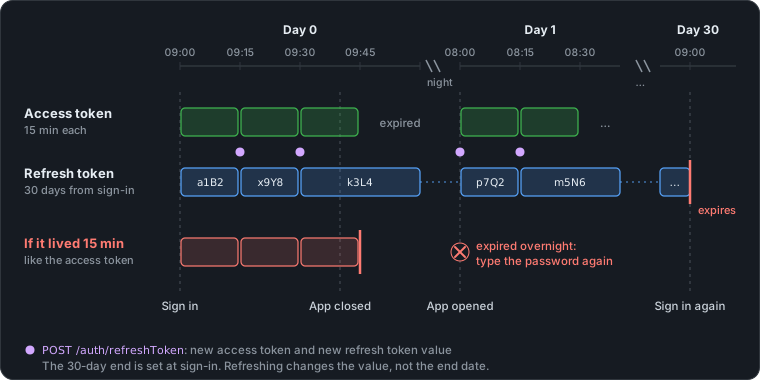
- While the app is in use, a new access token is fetched every 15 minutes. Each refresh also gives the refresh token a new value:
a1B2, thenx9Y8, thenk3L4. - Overnight, the app is closed and nothing gets refreshed. The last access token expires at 09:45 and nobody notices.
- The next morning, the first request finds an expired access token. The refresh token
k3L4is still valid, so the app refreshes and carries on. The user doesn’t see a sign-in screen. - On day 30, the refresh token expires, however many times it was rotated, and the user signs in again.
The red row shows the alternative. With a 15-minute refresh token, the session would have died at 09:45 together with the access token, and the user would have had to type their password again the next morning. The same would happen after every lunch break.
That is the point of having two tokens. Their lifetimes answer different questions:
- The access token’s lifetime is how long a copied token keeps working when nobody can stop it. Services check it only by its signature, and it is sent with every request to every service. So it should be short.
- The refresh token’s lifetime is how long a user can stay away from the app and still be signed in. In other words, it is the length of the session.
The refresh token can live this long because it is much better protected than the access token:
- It can be revoked. It is checked against the database every time, so logout, “log out everywhere” and a password change end it immediately.
- It travels less. It is sent to one endpoint on AuthService and nowhere else, not with every request and not to the other services.
- It is rotated. A copied value only works until the next refresh.
- It is never stored in plain text. On the device it is in the Keychain, and on the server only its SHA-256 hash is stored.
The 30-day end date is fixed on purpose. The other common choice is a sliding expiry, where every refresh pushes the end date 30 days further out. That signs active users out less often, but a session that is used regularly would then never end. With a fixed end, even a stolen refresh token that keeps being rotated stops working on day 30. The cost is that users sign in once a month.
SHA-256 for tokens, Bcrypt for passwords
AuthService stores four kinds of secret, and it doesn’t hash them all the same way:
| Secret | Who picks it | Possible values | Stored as |
|---|---|---|---|
| Password | The user | Often a common word or a reused password | Bcrypt |
| Email code | The server | 10⁶ (six digits) | Bcrypt |
| Refresh token | The server | 62⁴⁰ ≈ 2²³⁸ | SHA-256 |
| Password reset token | The server | 62⁴⁰ ≈ 2²³⁸ | SHA-256 |
What matters is how many values an attacker would have to try. Bcrypt is slow on purpose, so that guessing passwords from a leaked database takes too long. Passwords and six-digit codes need that: one million codes take a fraction of a second to try with SHA-256.
A refresh token is 40 characters picked at random from 62 letters and digits. No hash is fast enough to make 2²³⁸ guesses, so being slow adds nothing. And SHA-256 has one big practical advantage: the same input always gives the same hash. That makes the lookup above a single indexed query on token_hash. Bcrypt adds a random salt to every hash, so finding a refresh token would mean loading every row and checking them one by one.
Both helpers are small:
public static func createRefreshToken() -> String {
    let letters = "abcdefghijklmnopqrstuvwxyzABCDEFGHIJKLMNOPQRSTUVWXYZ0123456789"
    return String((0 ..< Constants.Length.REFRESH_TOKEN).map { _ in letters.randomElement()! })
}

/// Lowercase hex SHA-256 digest of the string's UTF-8 bytes (64 characters).
/// - Warning: Fast hash. Fine for high-entropy random tokens (e.g. refresh
///   tokens); never use it for passwords — use `Bcrypt.hash` instead.
public var sha256Hex: String {
    SHA256.hash(data: Data(utf8)).hex
}
randomElement() uses Swift’s SystemRandomNumberGenerator, which reads from the operating system’s cryptographically secure generator on both macOS and Linux. The warning on sha256Hex is there for whoever reads this code next and is tempted to reuse it for passwords.
The libraries behind them
AuthService doesn’t add a crypto package of its own. Both hashes come with Vapor:
- SHA-256 comes from Apple’s swift-crypto. It is the open-source version of CryptoKit with the same API: on Apple platforms it uses CryptoKit, and on Linux, where the service runs in Docker, it uses BoringSSL. Vapor depends on swift-crypto and re-exports it, so
import Vaporis enough to useSHA256.hash(data:). The.hexproperty that turns the digest into a string is a small helper from Vapor. - Bcrypt is built into Vapor. Vapor bundles a C implementation of Bcrypt and exposes it as the global
Bcrypt. Its default cost is 12, which means 2¹² rounds of the expensive key setup for every hash.
Vapor offers two ways to call Bcrypt, and AuthService uses both:
// Direct and synchronous: runs on the current thread.
let hash = try Bcrypt.hash(password)
let matches = try Bcrypt.verify(password, created: hash)

// Vapor's password API: Bcrypt by default, run on the app's thread pool.
let hash = try await req.password.async.hash(password)
let matches = try await req.password.async.verify(password, created: hash)
A Bcrypt hash takes long enough to be noticeable, and Vapor serves many requests on a few event-loop threads. Running it on one of those threads would hold up every other request on that thread. req.password.async moves the work to a separate thread pool, so most request handlers in AuthService use that form. The direct call is mainly left for places that can’t be async, such as the verify(password:) method that ModelAuthenticatable requires on the User model, and the migration that seeds the admin user.
Logging out
Because the refresh token lives in the database, ending a session just means deleting its row. There are two endpoints:
/// Ends one session. Always 204, so the endpoint never reveals whether a
/// token existed, and calling it twice is harmless.
@Sendable func logout(req: Request) async throws -> HTTPStatus {
    try RefreshTokenDTO.validate(content: req)
    let body = try req.content.decode(RefreshTokenDTO.self)
    try await UserToken.query(on: req.db)
        .filter(\.$tokenHash == body.refreshToken.sha256Hex)
        .delete()
    return .noContent
}

/// Ends every session of the caller, e.g. after losing a phone.
@Sendable func logoutAll(req: Request) async throws -> HTTPStatus {
    // JWTMiddleware stores the verified token's userId here.
    guard let userId = req.additionalInfo.flatMap(UUID.init(uuidString:)) else {
        throw Abort(.unauthorized)
    }
    try await UserToken.query(on: req.db)
        .filter(\.$user.$id == userId)
        .delete()
    return .noContent
}
/auth/logoutneeds only the refresh token. Whoever holds it can already use the session, so they are allowed to end it./auth/logoutAllsits behindJWTMiddleware, so it needs a valid access token. It deletes every refresh token of that user, on every device. Changing the password does the same, inside the same database transaction as the password update.
What logout can’t do
Logging out ends the refresh token. An access token that was already issued stays valid until it expires, because ContentDeliveryEngine checks access tokens only by their signature, without asking AuthService or the database.
The usual fix is a deny-list of revoked tokens, but then every service would have to check that list on every request, which removes the reason for using a signed token in the first place. AuthService takes the other route and keeps access tokens short-lived. They used to last 60 minutes, and that was cut to 15. So after a logout, a copied access token works for at most 15 more minutes.
On the iOS side
The app never waits for a 401 to find out that its token has expired. It refreshes the token just before a request needs it, using a client middleware.
What a middleware is
The app doesn’t build HTTP requests by hand. It calls methods like client.getDashboard() on the Client that Apple’s open-source swift-openapi-generator creates from openapi.yaml. Each call passes through a fixed pipeline:
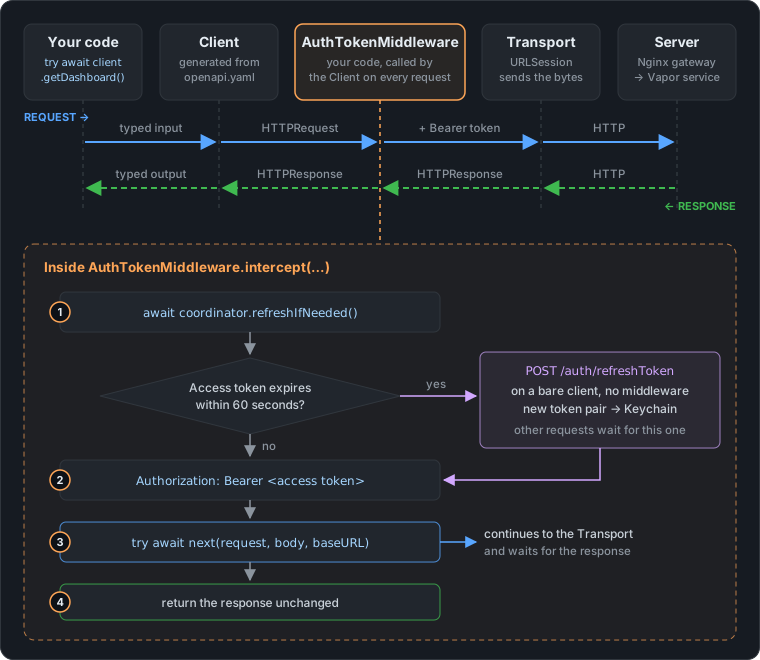
- Your code calls a typed method, such as
getDashboard(). - The generated
Clientturns that call into a plainHTTPRequest: method, path, headers and body. - Each middleware gets that request before it is sent. It can change the request, do some other work first, or stop the call. To let the request continue, it calls
next. - The transport (
URLSessionTransport) sends the request over the network. - The response travels back the same way. It passes through the middleware again, as the return value of
next, before theClientdecodes it into a typed result such as.ok(sections).
A middleware is just a type that conforms to ClientMiddleware, which has one method, intercept. It sits between the Client and the network, so it is the right place for work that every request needs. Adding the access token is that kind of work. Without a middleware, every method in APIService would have to remember to refresh the token and set the header itself.
When it runs
A middleware runs only for clients it was given to. APIService creates the client for authorized requests in one place:
private func authorizedClient() throws -> Client {
    Client(serverURL: try Servers.server2(),
           transport: URLSessionTransport(),
           middlewares: [AuthTokenMiddleware()])
}
getUser, getDashboard, getWorkoutDetail, getSubcategoryWorkouts and getVideo all go through this client, so AuthTokenMiddleware runs once before each of those requests is sent. Login, signup, email verification and the refresh call itself use clients without it. The refresh call has to: if it went through the middleware, the middleware would try to refresh the token before sending the refresh request, and so on forever.
Refreshing before the request
Here is the middleware. Everything before next happens before the request leaves the device:
struct AuthTokenMiddleware: ClientMiddleware {
    func intercept(_ request: HTTPRequest, body: HTTPBody?, baseURL: URL,
                   operationID: String,
                   next: (HTTPRequest, HTTPBody?, URL) async throws -> (HTTPResponse, HTTPBody?))
        async throws -> (HTTPResponse, HTTPBody?) {
        await TokenRefreshCoordinator.shared.refreshIfNeeded()

        var request = request
        let token = APIService.shared.token
        if !token.isEmpty {
            request.headerFields[.authorization] = "Bearer \(token)"
        }
        return try await next(request, body, baseURL)
    }
}
“If needed” means the access token expires within the next minute. The app reads that from the token’s own exp claim. A JWT’s payload is just base64url-encoded JSON, so the app can read it without the signing key.
One refresh at a time
Rotation creates a problem on the client. A screen can start several requests at once, for example getDashboard() and getUser(). If the token is about to expire, each of those requests would try to refresh it, all with the same refresh token. The first one rotates it. Each of the others then sends a token the server has just stopped accepting and gets a 401, which signs the user out.
An actor makes sure only one refresh runs at a time. Any other request that arrives meanwhile waits for that refresh to finish instead of starting its own:
actor TokenRefreshCoordinator {
    static let shared = TokenRefreshCoordinator()
    private var inFlight: Task<Void, Never>?

    func refreshIfNeeded() async {
        guard APIService.needsRefresh() else { return }
        if let inFlight {
            await inFlight.value        // someone is already refreshing: wait for them
            return
        }
        let task = Task { await APIService.performRefresh() }
        inFlight = task
        await task.value
        inFlight = nil
    }
}
Here is what happens when getDashboard() and getUser() start at almost the same moment and the access token is about to expire:
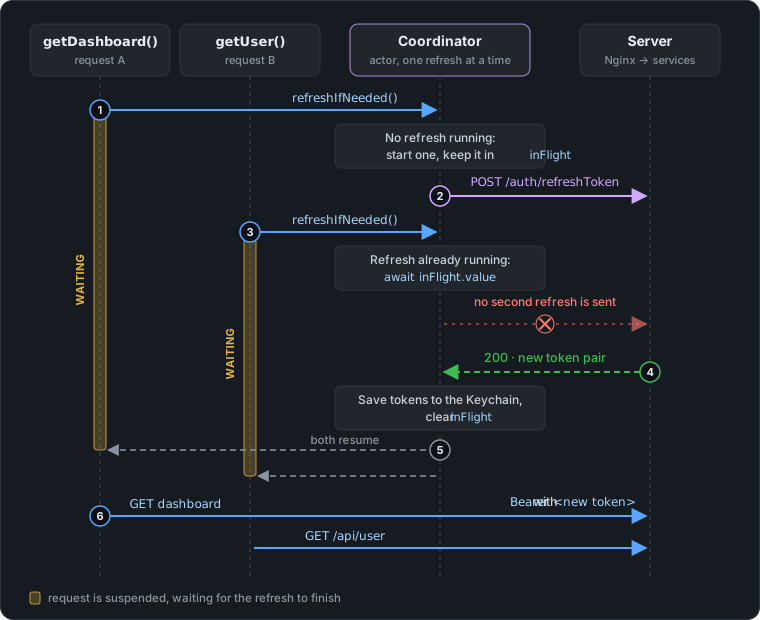
getDashboard()reaches the coordinator first. No refresh is running, so it starts one and keeps theTaskininFlight.- That task sends the only
POST /auth/refreshToken.getDashboard()is now suspended, waiting for it. getUser()arrives while the server hasn’t answered yet.inFlightis set, so it waits for the same task withawait inFlight.value. No second refresh request is sent.- The server returns the new token pair. It is saved to the Keychain and
inFlightis cleared. - Both requests resume.
- Both are sent with
Bearer <new token>.
Step 3 works because of how actors run code. An actor runs only one piece of its code at a time, but while one call is suspended at an await, it can start another. getDashboard() is suspended at await task.value, so getUser() can enter refreshIfNeeded(), find inFlight already set, and wait for it. A request that arrives after the refresh has finished doesn’t wait at all: needsRefresh() sees the fresh token and returns straight away.
When the refresh fails
performRefresh treats the two kinds of failure differently:
- The server rejects the refresh token (unknown or expired). The session can’t be recovered, so the app posts a
sessionExpirednotification.UserSessionobserves it and signs out, which clears the Keychain and shows the sign-in screen. - The network fails. The tokens are kept. The request fails as it would without a connection, and the next request tries again. A user on a train shouldn’t be signed out because of a tunnel.
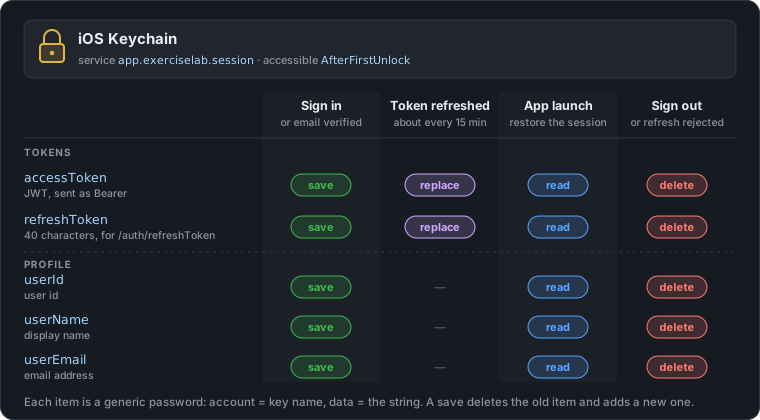
What the app keeps in the Keychain
Everything the app needs to stay signed in lives in the iOS Keychain. Here is what it stores, and which events save, replace, read or delete each item:
The next article in this series looks at how the access tokens are signed: rotating the ES256 signing keys without a restart, and publishing the public keys through a JWKS endpoint so the other services can verify tokens on their own.